Settings
Select on the hamburger menu in the upper right corner of the project screen, and select Settings.
The options under Settings allow you to establish the wall height, project units, the visibility of room shadows, and the ability to lock walls, openings, and rooms.
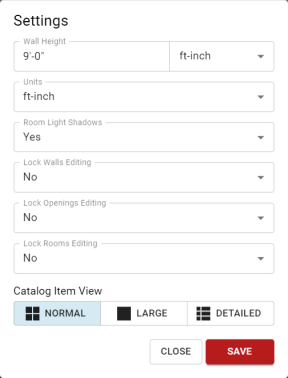
It also has settings for the catalog display. Giving you the ability to increase the size of the picture of catalog items by selecting Large or by displaying more information about the catalog items by selecting Detailed.
Once you have updated the settings, click Save to exit the options.